Category Archives: Client Success

Measuring marketing ROI - Smart insights and strategies

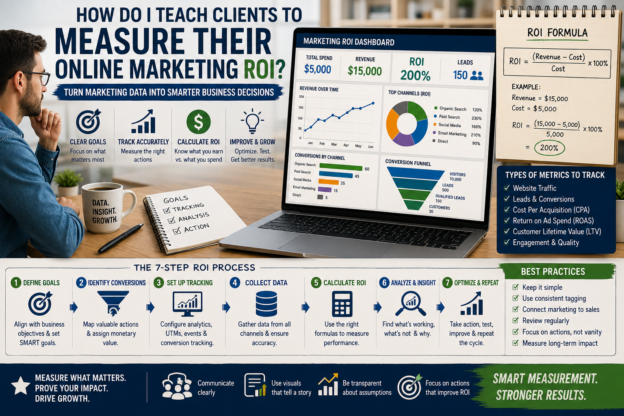
How do I teach clients to measure their online marketing ROI?

Measuring online marketing ROI (return on investment) is how businesses know whether their marketing dollars are working. For many clients, ROI feels like a mystery—data in dashboards, confusing acronyms, and lots of numbers. As an SEO-minded specialist, your job is to make ROI straightforward, repeatable, and tied to real business goals. This guide shows a simple, practical process you can teach clients so they can track performance, make better decisions, and feel confident about their marketing investments.

Define clear goals first

Before any metric or tool, confirm what “success” looks like for the client. Goals should be specific, measurable, and tied to business outcomes—not vanity.

  • Align with business objectives: revenue growth, lead volume, customer acquisition cost (CAC) reduction, retention, product adoption.
  • Use SMART goals: specific, measurable, achievable, relevant, time-bound. Example: “Generate 120 qualified leads per month from organic search within 6 months.”
  • Prioritize: choose one primary KPI (revenue, leads, signups) and up to two secondary KPIs (traffic quality, engagement, conversion rate).

Map conversions to value

Clients need to understand which actions are valuable and how to assign monetary value.

  • Identify conversion types: macro (sale, subscription) and micro (lead form, ebook download, demo request). Macro conversions typically map directly to revenue.
  • Assign value to conversions: for direct sales, use average order value (AOV) and purchase frequency. For leads, calculate lead value: Lead value = (Average purchase value × Conversion rate from lead to customer) × (Average number of purchases per customer) or use historical data to estimate.
  • Use proxy values when necessary: if lead-to-customer data is sparse, estimate conservatively and document assumptions.

Build a tracking plan

Tracking must be accurate to calculate ROI. Create a simple, prioritized tracking plan the client can implement.

  • Tagging and analytics setup: ensure Google Analytics 4 (or preferred analytics) is configured, with relevant events and conversions created.
  • UTM parameters: use consistent UTM tagging for campaigns so traffic sources and campaigns are clearly attributed.
  • Conversion funnels: map steps from source → landing page → action → thank-you page. Make sure thank-you pages or event triggers exist to record conversions.
  • CRM integration: connect marketing touchpoints to the CRM so you can follow leads through the sales lifecycle and measure actual revenue.
  • Attribution model: choose one (last-click, data-driven, first-click, linear) and explain trade-offs. Start with last-click to keep things simple, then evolve to data-driven as data volume grows.

Calculate basic ROI formulas

Teach clients a few straightforward formulas so they can quickly see performance.

  • Marketing ROI (simple): ROI = (Revenue from marketing − Cost of marketing) / Cost of marketing × 100%
    • Example: If a campaign generated $12,000 in tracked revenue and cost $3,000, ROI = (12,000 − 3,000) / 3,000 × 100% = 300%.
  • Return on Ad Spend (ROAS): ROAS = Revenue from ad campaign / Cost of ad campaign
    • Example: $6,000 revenue ÷ $2,000 ad spend = 3.0 (or 300%).
  • Lead-based ROI: if conversions are leads, use estimated lead value: ROI = (Leads × Lead value − Cost) / Cost × 100%
    • Example: 100 leads × $50 estimated lead value = $5,000; cost $1,250 → ROI = (5,000 − 1,250) / 1,250 × 100% = 300%.

Track both short-term and long-term value

Some marketing drives immediate sales, others build brand value over time.

  • Short-term: paid ads, promotions, immediate conversions—easy to attribute.
  • Long-term: SEO, content marketing, social presence—benefit may appear months later. Use cohort analysis and lifetime value (LTV) to capture long-term impact.
  • Combine both: report short-term metrics weekly/monthly and long-term impact quarterly.

Use dashboards and reports clients understand

Clients will ignore confusing dashboards. Build clear, focused reports.

  • Keep it to essentials: primary KPI, cost, revenue, ROI, trend lines, top-performing channels, and one suggested action.
  • Visuals: use simple charts—trend, channel comparison (bar), conversion funnel (stages).
  • Frequency: weekly for tactical, monthly for results & optimization, quarterly for strategy and budgeting.
  • Narrative: add 1–2 sentences interpreting the data and recommended next steps. Help clients see the “so what.”

Prove attribution without overcomplicating

Attribution can paralyze decision-making. Use practical approaches.

  • Start simple: attribute conversions to the last known marketing touch or use landing page attribution for campaigns.
  • Use assisted conversions: show how channels assist other channels (e.g., content that feeds retargeting).
  • Create experiments: A/B tests or holdout groups to prove causal impact (run a campaign in one region and not another).
  • Use multi-touch as you scale: move to data-driven attribution or use a marketing mix model when enough data and budget exist.

Optimize cost and efficiency

Clients want better ROI, not just more metrics. Teach them continuous improvement steps.

  • Improve conversion rates: small conversion rate increases multiply ROI. Test landing pages, CTAs, and forms.
  • Lower cost per acquisition (CPA): refine targeting, pause underperforming ads, improve quality score and relevance.
  • Increase average order value: upsells, bundles, free shipping thresholds.
  • Retain customers: cheaper to retain than acquire—measure churn and implement retention tactics (email sequences, loyalty programs).

Handle offline or hidden conversions

Not all conversions show up in analytics—teach how to capture them.

  • Offline sales: track coupon codes, unique phone numbers, or dedicated landing pages for offline campaigns.
  • Assisted leads: require sales to log marketing source in CRM when lead enters pipeline.
  • Surveys: ask new customers “How did you hear about us?” during checkout or onboarding.

Common pitfalls and how to avoid them

Warn clients about typical mistakes that distort ROI.

  • Mixing goals: don’t compare brand-awareness metrics directly to revenue goals; separate reports for awareness vs. performance campaigns.
  • Poor tagging: inconsistent UTMs break attribution—use a naming convention and document it.
  • Ignoring data quality: filter internal traffic, set up cross-domain tracking correctly, and exclude spam referrals.
  • Over-attribution to last-click: last-click can undervalue upper-funnel efforts—explain why and show alternative views.
  • Relying on guesses: estimate only when necessary and update assumptions with real data as it becomes available.

Make the math actionable with examples

Show clients quick examples so the calculations feel tangible.

Example 1 — E-commerce campaign

  • Cost: $5,000 ad spend.
  • Revenue (tracked): $20,000.
  • ROI: (20,000 − 5,000) / 5,000 × 100% = 300%.
  • Action: Scale successful creatives, test landing page variants to increase conversion rate, and calculate profit margin to ensure campaign is profitable after costs beyond ad spend.

Example 2 — Lead-gen B2B

  • Cost: $2,000 monthly marketing.
  • Leads: 80 per month.
  • Historical conversion: 10% of leads become customers.
  • Average deal value: $2,500.
  • Lead value: 0.10 × 2,500 = $250.
  • Revenue from leads: 80 × 250 = $20,000 estimated.
  • ROI: (20,000 − 2,000)/2,000 × 100% = 900%.
  • Action: Improve lead nurturing to increase lead-to-customer conversion, incorporate CRM tracking to replace estimates with actual closed-won data.

Scaling ROI measurement over time

As clients mature, refine measurement complexity gradually.

  • Phase 1 (0–6 months): basic tracking, UTMs, GA4 goals, simple ROI & ROAS calculations.
  • Phase 2 (6–18 months): CRM integration, cohort/LTV analysis, conversion rate optimization, multi-channel reporting.
  • Phase 3 (18+ months): data-driven attribution, marketing mix modeling, predictive LTV models, automated dashboards that combine marketing and finance data.

Practical checklist to teach clients

Give clients a short checklist they can follow each month.

  • Confirm primary KPI and its monetary value.
  • Verify analytics and conversion tracking are working.
  • Ensure UTMs are applied to all campaigns.
  • Pull last 30 days of traffic, conversions, revenue by channel.
  • Calculate ROI/ROAS for each campaign.
  • Identify top 1–2 actions to improve ROI next month.
  • Document assumptions and update lead/value estimates if better data exists.

How to present ROI results so clients act

Presentation matters—make it simple and decision-focused.

  • Start with the headline: “Campaign X returned 250% ROI this month.”
  • Show one chart and one table: trend of KPI and channel breakdown with cost vs. revenue.
  • State the recommended action: scale, optimize, pause, or test.
  • Be transparent about uncertainty: show confidence level and note assumed values.

Quick scripts and phrases to use with clients

Use plain language to demystify ROI during meetings.

  • “Let’s pick one business goal and measure only that for now.”
  • “We’ll assign a conservative value to each lead and update it as we get real sales data.”
  • “If this test returns a positive ROAS, we’ll scale it gradually and watch margins.”
  • “This channel looks like it assists other channels—let me show you how it helps close deals.”

Make ROI a habit, not a mystery

Teaching clients to measure marketing ROI is about simplicity, clarity, and repeatable routines. Start with one clear goal, make conversions measurable and valuable, set up reliable tracking, and report in a way that points to action. Grow complexity only when the data justifies it. With this approach clients will stop guessing and start investing with confidence.


Tools I Should Recommend to My Internet Marketing Counseling Clients for Faster Results

What Tools Should I Recommend to My Internet Marketing Counseling Clients for Faster Results?

Hey there, fellow marketers and business owners! If you’re counseling clients in internet marketing, you know the drill: they want results yesterday. Who can blame them? In today’s fast-paced digital world, slow progress feels like watching paint dry on a rainy day. But here’s the good news—you don’t have to reinvent the wheel. As an SEO specialist who’s all about what people actually search for on Google (think informational intent like “best tools for quick marketing wins”), I’ve got your back.

This guide zeros in on the top tools that deliver faster results for your clients. We’re talking automation, insights, and growth hacks that cut through the noise. No fluff, just proven picks that align with real searcher queries like “quick SEO tools” or “fast social media schedulers.” Let’s dive in and supercharge those client campaigns!


Keyword Research Tools

First things first—everything starts with keywords. Your clients need tools that uncover what people are typing into Google right now, without wasting hours. Recommending the right ones means quicker traffic spikes and happier clients.

Google Keyword Planner is your free MVP. It’s straight from the source (Google Ads), spitting out search volume, competition levels, and bid estimates. Clients love how it predicts trends—say, spotting “AI content tools” before it explodes. Pro tip: Pair it with client-specific niches, like “local SEO for plumbers,” for tailored, rapid wins. Setup takes minutes, and boom—optimized content ideas flow.

For a step up, Ahrefs crushes it with its massive keyword database (over 20 billion keywords!). It shows “Clicks Per Search” (CPS), revealing high-traffic gems others miss. Imagine telling a client, “Target this keyword for 10x faster rankings.” Their Site Explorer tool reverse-engineers competitors’ top pages, saving weeks of guesswork. Pricing starts at $99/month, but the ROI? Lightning-fast backlinks and content strategies.

Don’t sleep on SEMrush. It’s a beast for gap analysis—type in a competitor’s URL, and it lists keywords they’re ranking for that your client isn’t. With its Position Tracking, clients see daily rank changes, motivating tweaks for speedier results. Free tier for basics, then $119/month for full power. Searchers rave about it in queries like “best SEMrush alternatives,” proving its popularity.

These tools turn vague ideas into data-driven plans. Clients implement faster, rank higher sooner—win-win!


Analytics and Tracking Tools

Tools without tracking? Like driving blindfolded. Recommend these to show clients proof of progress, keeping them hooked and scaling quick.

Google Analytics 4 (GA4) is non-negotiable—free and packed with user behavior insights. It tracks events like form submissions or video views, linking directly to revenue. For counseling clients, highlight custom dashboards: “See your email open rates skyrocket in one glance.” The real-time report? Magic for spotting live traffic surges post-campaign.

Upgrade to Google Search Console (GSC) for SEO-specific gold. Free, it flags indexing issues, click-through rates (CTR), and mobile usability errors. Clients fix “core web vitals” problems overnight, boosting rankings fast. Query data shows impressions vs. clicks—perfect for “low-hanging fruit” keywords with high potential.

For deeper dives, Hotjar adds heatmaps and session recordings. Watch where users drop off on a client’s landing page, then fix it pronto. Surveys pop up for feedback, accelerating A/B tests. Starts free, scales to $32/month. Clients geek out over visuals proving “that button tweak doubled conversions!”

MonsterInsights (WordPress plugin) simplifies GA4 for non-techies. One-click setup, e-commerce tracking, and affiliate link reports—ideal for small biz clients chasing quick sales lifts. Free lite version hooks ’em, pro at $99/year seals the deal.

With these, clients shift from “Is it working?” to “How do we scale this?”—results in days, not months.


Content Creation and Optimization Tools

Content is king, but slow creation kills momentum. Arm clients with these for high-quality output that Google loves, pronto.

Surfer SEO optimizes on the fly. Input a keyword, and it scores your draft against top-ranking pages—structure, terms, readability. Clients hit 90+ scores easily, ranking faster. Integrates with Google Docs; $59/month starter plan. Search volume for “Surfer SEO review” is huge—people want this speed!

Jasper.ai (formerly Jarvis) generates blog posts, ads, and emails via AI. Train it on brand voice, and it spits polished copy in minutes. Use templates for “product descriptions” or “SEO meta titles.” Starts at $39/month—clients cut writing time by 80%, freeing hours for promotion.

For visuals, Canva Pro is a no-brainer. Drag-and-drop infographics, social graphics, and thumbnails tailored for marketing. Magic Studio’s AI removes backgrounds or generates images from text. Free basics, pro $12.99/month. Pairs perfectly with content for shareable, viral boosts.

Grammarly Business polishes everything. Beyond grammar, it suggests tone tweaks and plagiarism checks. Clients sound pro without endless edits—faster publishing, better engagement. Free for individuals, $15/user/month for teams.

These streamline the content pipeline, turning ideas into indexed pages super quick.


Email Marketing and Automation Tools

Leads go cold without follow-up. Recommend automation that nurtures 24/7 for explosive growth.

Mailchimp is beginner-friendly with intuitive drag-and-drop builders. Automations trigger welcome series or abandoned cart emails. Free up to 500 contacts; scales affordably. Analytics show open/click rates—clients optimize for higher conversions fast.

ActiveCampaign shines for advanced stuff. Deep segmentation (e.g., “leads from SEO pages”) and machine learning score leads. If/then automations save time; starts at $29/month. Clients report 30% faster sales cycles.

ConvertKit caters to creators—tag-based automations for courses or newsletters. Visual builder, subscriber scoring, and integrations galore. Free to 1,000 subs; $29/month after. Perfect for counseling solopreneurs.

Automation means consistent touchpoints without daily grind—results compound weekly.


Social Media and Advertising Tools

Social proof builds trust fast. These tools schedule, analyze, and advertise for maximum visibility.

Buffer schedules posts across platforms with optimal timing suggestions. Analytics compare performance; free for basics, $6/channel/month pro. Clients post consistently, growing followers quick.

Hootsuite handles monitoring and team collab. Track mentions, respond fast, and run ads. Free trial, $99/month pro. Great for “social listening tools” searches.

For ads, Google Ads with Smart campaigns automates bidding for quick leads. Set budget, keywords, and watch conversions roll in. Free to use (pay per click).

Meta Business Suite unifies Facebook/Instagram ads and organic. Insights dashboard predicts best audiences—faster ROI.


Backlinks are SEO rocket fuel. Tools that find and secure them speed up domain authority.

Hunter.io finds emails for outreach. Verify and personalize pitches; free 50/month, $49 pro.

BuzzSumo spots trending content for guest post ideas. Alerts for mentions; $99/month.

Pitchbox automates outreach sequences. CRM integration tracks responses; starts at $195/month for agencies.

Clients land links faster, climbing ranks in weeks.


Project Management and Collaboration Tools

Chaos slows everything. These keep counseling sessions and executions smooth.

Trello with Power-Ups for marketing boards. Free, visual, simple.

Asana for tasks, deadlines, and integrations. Free basic, $10.99/user/month premium.

ClickUp all-in-one: docs, goals, AI assistant. Free forever plan rocks.


Fast-Track Your Clients’ Success

There you have it—a powerhouse toolkit for internet marketing counseling that delivers faster results. From keyword digs to automated emails, these picks match what searchers crave: practical, quick-win solutions. Start with free tiers to demo value, then scale as clients see ROI.

Recommend stacking 3-5 based on their goals—SEO newbie? Ahrefs + GA4 + Surfer. E-com hustler? ActiveCampaign + Google Ads + Hotjar. Watch campaigns accelerate, retention soar, and referrals roll in.

Your clients will thank you (and so will their bottom line). Ready to level up? Pick one tool today and test it live. What’s your client’s biggest bottleneck? Tools like these fix it fast!

How Do I Help Clients Understand SEO Without Overwhelming Them

How Do I Help Clients Understand SEO Without Overwhelming Them?

Hey there, fellow marketer or agency owner! If you’ve ever stared at a client who’s glazing over at the mention of “backlinks” or “meta tags,” you’re not alone. SEO can feel like rocket science to newcomers, but it doesn’t have to be. The good news? You can break it down into bite-sized, fun pieces that stick without turning their brains into scrambled eggs. In this post, we’ll walk through simple, proven ways to demystify SEO for your clients—keeping things light, relatable, and overwhelm-free. Let’s dive in and make SEO as approachable as your favorite coffee run.

Picture this: Your client nods enthusiastically when you promise more website traffic, but the second you drop terms like “crawl budget” or “schema markup,” their eyes widen like they’ve just heard a ghost story. We’ve all been there. The key to helping them get it? Start with the “why” before the “how.” Explain SEO as a friendly neighborhood party where Google’s inviting the right guests to your site. No need for PhDs—just everyday language that ties back to their goals, like getting more calls or sales.

Keep sessions short and snappy, too. Aim for 20-minute chats instead of hour-long deep dives. Use visuals like doodles or quick sketches: Draw a treasure map where keywords are the X-marks-the-spot. Clients love seeing their business as the hero on a path to Google gold. And always end with one actionable takeaway, like “Try this keyword tool today.” Boom—understanding without the burnout.


Use Everyday Analogies to Make SEO Click

Nothing kills a good SEO chat faster than jargon overload. Swap tech talk for stories they already know. Think of SEO like dating: Your website is swiping right on Google, and strong SEO is the killer profile pic and bio that gets matches (aka traffic).

For on-page SEO, compare it to dressing up for a first date. “Headlines are your outfit—make ’em sharp and eye-catching. Body content is your personality—keep it genuine and packed with value.” Clients chuckle, nod, and suddenly remember it forever. Off-page SEO? That’s building a social circle. “Backlinks are like friends vouching for you at the bar. Quality over quantity—who wants a thousand flaky acquaintances when three solid ones open doors?”

Take keyword research: Don’t shove spreadsheets at them. Say it’s like picking the perfect playlist for a road trip. “You scout what songs (keywords) your audience loves, mix high-energy hits with chill vibes, and avoid stuff nobody searches.” Tools like Google Keyword Planner become your easy GPS—no overwhelming data dumps.

Real talk from my agency days: One client owned a bakery. I likened domain authority to a bakery’s Yelp stars. “Google trusts sites with good reps, just like customers trust your five-star scones.” She got it instantly and started guest posting like a pro. Analogies bridge the gap, turning “overwhelm” into “oh, I see!”

Pro tip: Tailor analogies to their world. Plumber client? SEO is unclogging pipes for smooth traffic flow. Fitness coach? It’s like progressive overload—small, steady gains build muscle (rankings). This personalization makes them feel seen, not schooled.


Hands-On Demos and Visuals Beat Lectures Every Time

Who learns best from death-by-PowerPoint? Nobody! Ditch the slides and go interactive. Fire up Google and search their top keyword together. “See how competitors pop up first? That’s because their site’s optimized—like a neon sign in a foggy night.”

Screen-share tools like Google Analytics or Search Console. Zoom in on real numbers: “Last month, this page got 500 visitors because its title matched what folks type.” Clients light up seeing their data sparkle—no abstract theory needed.

Free tools are your besties here. Show Ahrefs’ free backlink checker or SEMrush’s position tracking. “Watch—type your site, and voilà, a snapshot of your SEO health score.” It’s like a fitness app for websites; they track progress without you holding their hand forever.

For content SEO, whip up a quick Google Doc demo. Paste their homepage text, highlight keywords in yellow, and suggest tweaks. “Add ‘best coffee in Tupi’ naturally, like chatting with a friend.” They edit live and feel the power. Visuals stick 65% better than words alone—science says so, but we keep it fun.

I once helped a local Soccsksargen retailer with a “SEO health check” video call. We used Canva to mock up an optimized page vs. their current one. Side-by-side magic: Traffic projections doubled in her mind. She implemented changes that week. Hands-on turns passive listeners into active doers.

Don’t forget memes! Share a “SEO explained” comic where a confused cat finally gets it. Laughter lowers defenses, paving the way for real learning.


Build a Simple Roadmap with Bite-Sized Wins

Clients tune out without a clear path. Hand them a one-page “SEO Adventure Map”—no 50-step monster plans. Divide into three playgrounds: Quick Wins, Steady Builds, Long Games.

  • Quick Wins (Week 1): Optimize titles and descriptions. “Like window shopping—make Google shoppers stop and click.” Expect 10-20% traffic bumps fast.
  • Steady Builds (Months 1-3): Content calendar with 2-3 posts/month targeting easy keywords. “Plant seeds that grow into traffic trees.” Track with simple monthly reports: graphs only, no spreadsheets.
  • Long Games (Ongoing): Link building and technical tweaks. “The marathon that wins the race—partner with locals for shoutouts.”

Color-code it: Green for done, yellow for doing, red for next. Clients check off boxes like a game, staying motivated without drowning in details.

Celebrate mini-victories! After their first ranking jump, send a goofy trophy emoji: “Congrats, SEO rookie—you’re leveling up!” Positive vibes keep them hooked.

For reporting, use dashboards like Google Data Studio. One graph per goal: Traffic, leads, rankings. “See the upward arrow? That’s your hard work paying off.” No jargon footnotes.

One client, a digital marketer like you, went from SEO skeptic to evangelist after our roadmap. She shared it with her network—talk about organic growth!


Common Pitfalls and How to Dodge Them Light-Heartedly

Even pros trip up. Here are the 3 common pitfalls and how to dodge them.

  • Pitfall one: Overpromising. Don’t say “Top of Google in 30 days!” Instead: “SEO’s a garden—consistent tending brings blooms over time.” Set realistic expectations with fun timelines: “Sprout stage: 1 month. Flower power: 3-6 months.”
  • Pitfall two: Info overload. Stick to 3 key metrics per meeting. Bounce rate? “How sticky your site is—like if guests linger at your party.”
  • Pitfall three: Ignoring mobile. Show their site on your phone: “Half your visitors are here—squishy text scares ’em off!” Fix with Google’s Mobile-Friendly Test—quick win.

Handle questions with “parking lot” notes: Jot advanced stuff for later, keeping focus tight.

Laugh off failures: “My first client thought alt text was a hair product. We fixed it—and ranked for ‘best stylist’!”


Your Clients Will Thank You

Helping clients grasp SEO without overwhelm boils down to empathy, simplicity, and fun. Use analogies from their life, demo live, map easy steps, and dodge jargon bombs. They’ll not only understand—they’ll love it and stick with you longer.

Start small: Pick one tip from here, try it next client call. Watch the lightbulbs glow.

What’s the Best Way to Track Client Progress in Internet Marketing Counseling

What’s the Best Way to Track Client Progress in Internet Marketing Counseling?

When you’re helping clients grow their online presence, tracking their progress is key to showing real results. Without clear tracking, you can’t know what’s working, what needs fixing, or how to improve your strategies. So, how do you best keep an eye on progress in internet marketing counseling? Let’s dive into the simplest and most effective ways to do just that.

1. Set Clear, Measurable Goals Together

Before tracking progress, you and your client need to know what success looks like. Defining goals upfront makes everything easier to measure. You might set targets like increasing website traffic, improving social media engagement, or boosting lead generation numbers. Make sure these goals are specific, measurable, achievable, relevant, and time-bound (SMART). For example, “Increase organic search traffic by 20% in three months” is much clearer than “Get more visitors.”

Once you have your goals, you can pick which metrics to track. This helps focus your efforts and keeps the counseling sessions productive. If your client wants better email marketing results, then metrics like open rates and click-through rates become your progress markers.

2. Use Online Tools to Monitor Key Metrics in Real-Time

The internet marketing world offers plenty of tools that make tracking a breeze. Using the right platforms lets you and your clients see real-time data and understand how campaigns perform. Here are some essentials you should consider:

  • Google Analytics: This tool’s a must-have because it shows detailed website data such as traffic sources, user behavior, and conversion rates. You can track how many visitors come to the site, what pages they visit, and whether they complete desired actions.
  • SEO Tools (like SEMrush or Ahrefs): These platforms track keyword rankings, backlink profiles, and competitor performance. You can show clients how their SEO efforts affect their visibility on search engines.
  • Social Media Analytics: Each network (Facebook, Instagram, LinkedIn) has built-in insights. These tell you about reach, engagement, follower growth, and which posts perform best.
  • Email Marketing Platforms: Programs like Mailchimp and Constant Contact display open rates, clicks, and subscriber growth to measure email campaign success.

Using these tools regularly means you can spot trends early and adjust campaigns before small problems turn into big setbacks. Plus, sharing dashboards with clients builds transparency and trust.

3. Create Easy-to-Understand Progress Reports

Clients usually aren’t digital marketing experts, so it’s your job to explain progress clearly. Don’t overwhelm them with technical jargon or endless data. Instead, prepare simple monthly or weekly reports that highlight what matters most.

Focus on key performance indicators (KPIs) tied to the goals you set. For example, if the goal is lead generation, show the number of new leads, their source, and how that compares to the previous period. Use charts or infographics where possible because visuals make data easier to grasp.

In your reports, explain what the numbers mean in plain language. For example, you could say, “Your website traffic increased by 15%, which means more people are finding your business online.” Also, include clear next steps or recommendations based on the progress.

4. Hold Regular Check-Ins and Adjust Strategies

Tracking data isn’t just about numbers; it’s about conversations. Set up weekly or biweekly meetings with clients to review the results together. These sessions let you explain the data, answer questions, and plan next actions.

During these check-ins, ask clients how they feel about the results and the process. Sometimes, their insights can reveal issues data might miss, such as customer feedback or brand perception.

Be ready to pivot your strategies if something isn’t working. Internet marketing is dynamic, so flexibility is key. Progress tracking combined with open communication makes your work collaborative and more effective.

5. Use Project Management Tools to Track Task Completion

Beyond just marketing metrics, tracking client progress means keeping your work organized. You and your client should use project management tools like Trello, Asana, or Monday.com to list tasks, deadlines, and updates.

These tools show what has been done and what’s coming next, making it easy to stay on track. Clients feel more involved and informed when they can see task progress and timelines at a glance.

By linking task completion with marketing results, you give a complete picture of progress. This helps clients understand the effort behind the scenes and gives you clear accountability.

6. Collect Qualitative Feedback Alongside Quantitative Data

Numbers tell one side of the story, but client feedback adds valuable context. Ask your clients regularly how they feel about campaign outcomes, whether they’ve noticed business changes, or if their own customers have shared opinions.

You can collect this feedback verbally during meetings or through quick surveys. Combining qualitative insights with data helps you create stronger strategies tailored to client needs.

Sometimes, progress in client satisfaction and confidence is just as important as numbers. Tracking this helps you improve your counseling approach and build lasting relationships.


Wrapping It Up

The best way to track client progress in internet marketing counseling blends clear goal setting, smart data tracking tools, regular communication, and organized task management. Focus on measurable targets, use real-time analytics, share easy-to-understand reports, and keep your clients in the loop. Don’t forget to gather their feedback too—it completes the picture.

By following these steps, you’ll not only show real results but also build trust and help your clients feel confident about their online growth journey. Tracking progress isn’t just about numbers—it’s about making marketing smarter and more effective for everyone involved.

How Do I Set Realistic Expectations For My Counseling Clients

How Do I Set Realistic Expectations For My Counseling Clients

Setting realistic expectations for your counseling clients is essential for a productive and positive therapeutic experience. You can start by clearly explaining what therapy can and cannot do, emphasizing that it’s a process that takes time and effort from both sides. Help clients understand that therapy is a safe space to explore feelings and behaviors but not a quick fix or cure-all. Setting achievable goals together and preparing them for ups and downs in their journey will keep expectations grounded and realistic.

Why Setting Realistic Expectations Matters

When you set realistic expectations, you create a foundation of trust and clarity, so clients don’t get discouraged by setbacks or slow progress. Counseling isn’t usually a linear path where things get better with every session. You want to remind clients that experiencing ups and downs is normal and part of deeper healing. If clients expect immediate transformations or constant improvement, they might feel frustrated or even give up too soon. Instead, let them know that therapy is about learning, growing, and building skills to improve emotional and mental well-being over time.

How to Set Clear and Realistic Expectations

  1. Start at the very beginning: In your first session or consultation, talk openly about what counseling involves and how it works. Discuss what they want to achieve and what a realistic timeline might look like. Ask them what expectations they already have—this helps you correct any misconceptions early on.
  2. Define therapy goals together: Work collaboratively to set specific, measurable, and achievable goals. Whether they want to reduce anxiety, improve relationships, or manage trauma, the goals should be clear but flexible. Explain that goals can evolve as therapy progresses.
  3. Explain the counselor’s role: Make sure your client knows that your job is to support and guide, not to “fix” them. Therapy requires their active participation and commitment to growth. They can expect tools and techniques but should also be ready to do emotional work and self-reflection.
  4. Prepare them for the process: Emphasize that therapy takes time—like building muscle at the gym, mental and emotional changes happen gradually with effort. Remind them it’s perfectly normal to feel worse sometimes before feeling better, and that setbacks happen without meaning failure.
  5. Discuss confidentiality and boundaries: Clients should know the limits of confidentiality and the professional boundaries you maintain. This transparency builds trust and reduces misunderstandings.
  6. Encourage questions and feedback: Invite clients to ask questions whenever they feel uncertain or stuck. They should feel comfortable discussing how therapy is going and whether adjustments are needed.

Tips to Keep Expectations Realistic as Therapy Progresses

  • Regularly revisit goals: Check in on goals together during sessions to see what’s working and what might need adjustment. This keeps therapy aligned with your client’s growth and shifts in life circumstances.
  • Celebrate progress, big or small: Help clients notice and acknowledge improvements, even small ones. This builds motivation and a sense of accomplishment, counterbalancing the tough moments.
  • Normalize setbacks: When clients hit plateaus or regress, remind them this is a natural part of healing, not a failure. These moments can be opportunities for deeper insight and growth.
  • Set realistic timelines: Avoid promising quick fixes. Instead, discuss how some issues might take months or longer to address fully, helping clients pace themselves.
  • Be flexible with methods: Let clients know that therapy might explore unexpected topics or try different approaches as needed. This keeps the process dynamic and responsive.

The Path to Better Outcomes

Setting realistic expectations is about clear communication, collaboration, and patience. By being upfront about the counseling process and what clients can expect, you help them approach therapy with a healthy mindset. This improves engagement, reduces frustration, and increases the chances of lasting change. Remember, therapy is a journey you and your client travel together, with its unique rhythms and discoveries.

With this approach, you ensure your clients feel informed, safe, and motivated to work toward their well-being at a pace that’s right for them.